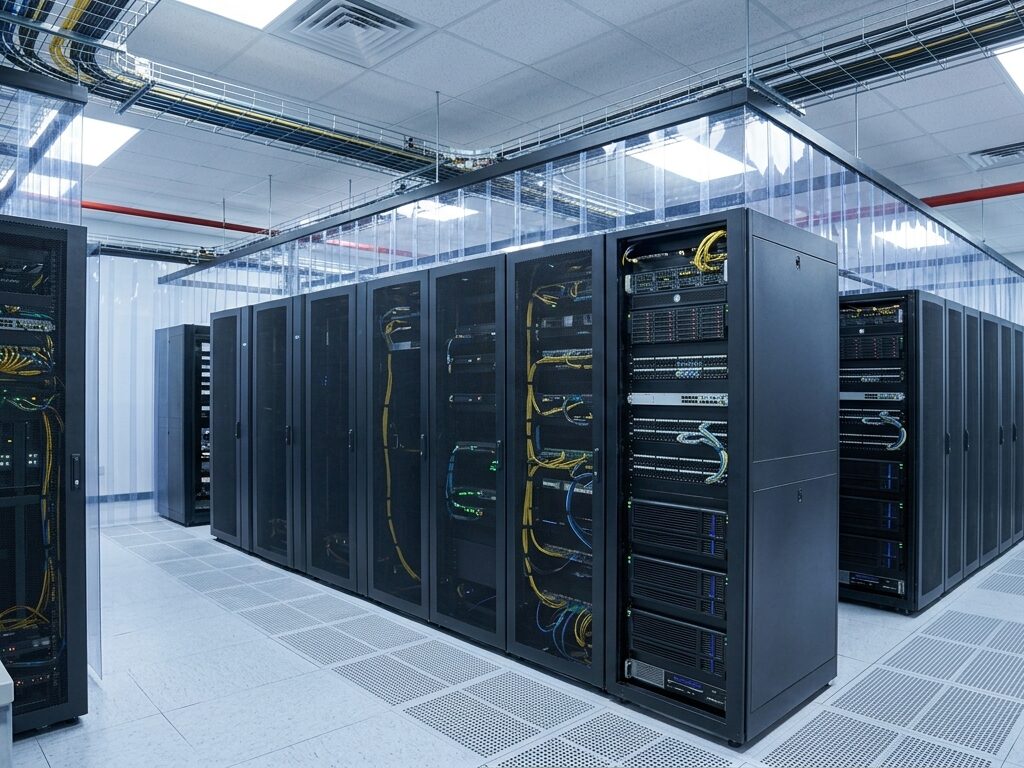
Heat is the silent enemy of every server room. Left unchecked, it shortens equipment life and disrupts operations. Therefore, smart businesses invest in reliable cooling solutions early. This guide explains why cooling matters and how to choose the right setup.
Why IT Cooling Solutions Matter for Business Continuity
Servers, switches, and storage devices generate constant heat. Moreover, high temperatures force components to work harder. As a result, hardware fails sooner than expected.
Downtime is costly. Even a short outage can halt sales, delay payroll, and frustrate customers. Consequently, stable temperatures protect both your data and your revenue.
Good cooling also supports consistent performance. Cool processors run faster and throttle less. In addition, stable conditions reduce unexpected reboots and data corruption.
Common Risks of Poor Data Center Cooling
Overheating rarely announces itself. Instead, small problems build up quietly. Here are the most common risks:
- Hardware failure: Excess heat degrades chips, drives, and power supplies.
- Unplanned downtime: Thermal shutdowns interrupt critical services.
- Higher energy bills: Struggling systems consume more power.
- Shorter equipment lifespan: Components age faster in hot rooms.
- Data loss: Failing drives may corrupt or erase stored files.
Furthermore, humidity matters just as much as temperature. Too much moisture causes corrosion. Too little invites static discharge. Hence, a balanced environment is essential.
Types of Server Room Cooling Systems
Every facility has different needs. Therefore, you should match the system to your space and budget.
Precision Air Conditioning
Precision units are built for IT environments. They control temperature and humidity tightly. Additionally, they run around the clock without strain. Comfort air conditioners cannot match this reliability.
In-Row Cooling
In-row units sit between server racks. They deliver cool air close to the heat source. As a result, they improve efficiency and reduce wasted airflow. This option suits dense, high-load racks.
Hot and Cold Aisle Containment
Containment separates hot exhaust from cool intake air. Consequently, cooling units work less and cost less. This method is affordable and effective. Moreover, it works well with existing systems.
Liquid Cooling
Liquid cooling removes heat faster than air. Thus, it suits high-performance computing and heavy workloads. Although installation costs more, long-term savings can justify it.
How to Choose the Right Cooling Solution
Start with a heat load assessment. Calculate the total power your equipment draws. Then, add room for future growth. Otherwise, you may outgrow your system within months.
Next, consider your room layout. Airflow paths, ceiling height, and rack placement all affect results. Similarly, check your power supply and backup options.
Finally, think about redundancy. A single cooling unit is a single point of failure. Therefore, plan for backup capacity. This keeps operations steady during repairs or faults.
Best Practices for Efficient IT Cooling
Good habits extend the value of any system. Follow these simple steps:
- Monitor continuously: Install sensors for temperature and humidity.
- Seal gaps: Block air leaks around cables and racks.
- Use blanking panels: Fill empty rack spaces to guide airflow.
- Clean regularly: Dust blocks vents and traps heat.
- Schedule maintenance: Inspect filters, coils, and fans often.
In addition, keep temperatures within recommended ranges. Most guidelines suggest 18°C to 27°C for server rooms. However, always check your manufacturer’s specifications.
Energy Efficiency and Cost Savings
Cooling can consume nearly half of a data center’s energy. Fortunately, efficient design cuts this sharply. For instance, containment and variable-speed fans lower power use.
Moreover, free cooling uses outside air when conditions allow. This approach reduces reliance on mechanical systems. Over time, the savings add up.
Efficient cooling also supports sustainability goals. Lower energy use means a smaller carbon footprint. Hence, you protect both your budget and the environment.
Cooling Solutions for Small Businesses and Large Enterprises
Small offices often use a single server closet. In this case, a compact precision unit works well. It offers protection without heavy investment.
Large enterprises face greater complexity. They need scalable, redundant systems with remote monitoring. Likewise, they benefit from professional design and regular audits.
Regardless of size, every business can improve its cooling. Even small upgrades deliver noticeable results.
Partner with Experts for Reliable Performance
Professional installation matters. Experts assess your needs and design a tailored system. Furthermore, they provide ongoing maintenance and rapid support.
Choose a provider with proven experience. Ask about response times, warranties, and monitoring options. Also, request references from similar projects.
Conclusion: Protect Your Technology Investment
Reliable cooling is not optional. It safeguards your hardware, data, and reputation. Moreover, it reduces costs and prevents painful outages.
Assess your current setup today. Identify weak spots and plan upgrades. Then, partner with specialists who can deliver lasting results. With the right cooling solutions, your IT infrastructure will run smoothly for years.
Leave A Comment